Scientific Collecting Permits

Overview

woman pointing at something in tide pool

Apply For or Manage Your Permit

Scientific Collecting Permit Portal

Fish and Game Code (FGC) sections 1002, 1002.5 and 1003 authorize CDFW to issue permits for the take or possession of “wildlife” for scientific, educational, and propagation purposes. Wildlife includes mammals, birds and the nests and eggs thereof, reptiles, amphibians, fish, certain plants, and invertebrates. CDFW implements this authority through Section 650, Title 14, California Code of Regulations (CCR), by issuing Scientific Collecting Permits (SCPs) to take or possess wildlife for such purposes.

Animals that are listed as Threatened, Endangered, or Candidate under the California Endangered Species Act (CESA) and Fully Protected species may not be taken or possessed pursuant to an SCP and require a separate CESA or Fully Protected Memorandum of Understanding for research purposes. In addition, marine mammals listed under the federal Marine Mammal Protection Act and wild, feral, or undomesticated burros may not be taken or possessed pursuant to an SCP.

Terrestrial and freshwater plants are exempt from the requirements of an SCP. However, an SCP does not authorize take or possession of a plant listed as rare, threatened, endangered, or a candidate species (PDF) pursuant to the Native Plant Protection Act (NPPA) or CESA. To obtain a Voucher Collecting Permit to collect state-listed plants for identification purposes, or to apply for a scientific, educational, or management permit for state-listed plants, please visit the CDFW Native Plant Program page and/or email nativeplants@wildlife.ca.gov. You may need a permit to work in the vicinity of state-listed plants even if you are not collecting them.

Regulations

SCP regulations were updated in 2018 and 2024.

The SCP regulations reference several forms, most of which have been integrated into the online SCP Portal. All SCP applications and amendments, as well as most required reports, must be submitted through the SCP Portal.

How to Start? Preparing to Apply

General or Specific Use?

CDFW issues two types of SCPs: General Use and Specific Use. The permit type you need will depend on the proposed project. A given project or planned undertaking will typically require either a General Use or a Specific Use SCP.

General Use SCP

General Use SCPs authorize a narrow set of activities and do not authorize take or possession of species designated as “Prohibited Wildlife” (e.g., threatened or endangered species, species of special concern, fully protected species). General Use applications are separated by their respective SCP review program based on taxonomic groups: Inland Fisheries (reviewed by Fisheries Branch), Marine (reviewed by Marine Region), and Terrestrial Wildlife (reviewed by Wildlife Branch). Each General Use SCP can only authorize take from one SCP review program.

Before applying for a General Use SCP, you should closely review the following pre-specified authorizations to ensure your project falls within the defined scope:

Specific Use SCP

All activities or species not included in the narrow scope of a General Use SCP (as described above) require a Specific Use SCP. Specific Use permits may also authorize activities that involve taxonomic groups from more than one SCP review program. Additionally, if you propose working with a state-designated Marine Protected Area, you will need to apply for a Specific Use permit.

Permitholder Types

There are three options for who applies for, and holds, a SCP: Individual, Student, and Entity. Please refer to Scientific Collecting Permit Portal (SCPP) Roles guide (PDF) for explanations of the different roles of an Individual Permit and Entity Permit.

Individual Permit

  • Permit is held by a single individual who serves as both the Permitholder and the Principal Investigator (PI).
  • The PI must follow requirements in subsection (b)(19) of Section 650, Title 14, CCR.
  • There is only a single PI allowed per General or Specific Use SCP, and permits cannot be transferred.
  • Permits are valid for three years and eligible for renewal.

Student Permit

  • Only enrolled students that are 18 years or older may apply as Student Permitholders.
  • Fees are lower than those for Individual or Entity permitholders.
  • Permits cannot be transferred.
  • Permits are valid for one year and eligible for renewal.

Entity Permit

  • Permit is held by an Organization, Institution, Agency, Native American tribe, or similar group.
  • Fees are the same as for Individual permits.
  • Permits are valid for three years and eligible for renewal.

In the SCP Portal, the Executive Signatory sets up the Entity profile and authorizes Entity Administrators. The Entity Administrator may apply for SCPs on the Entity's behalf. The PI for each permit is responsible for all permitted activities and provides adequate supervision of all persons named on the List of Authorized Individuals. The PI must follow requirements pursuant to subsection (b)(19) of Section 650, Title 14, CCR.

Activities with Terrestrial and Vernal Pool Invertebrates

Most terrestrial invertebrates that occur in non-aquatic terrestrial environments (i.e., above mean high tide of marine waters or aerial life stage of aquatic insects) are exempt from an SCP except:

Additional guidance can be found on the CDFW Research Permitting Flowchart for Terrestrial Invertebrates.

Application Process

Registration and Profile Creation

  • Access the SCP Portal to register and create a Login ID. Follow the Creating and Managing Your Login ID (PDF) guidance document.
  • If you plan to apply for an Individual permit, follow the steps to create an Individual profile (PDF).
  • If you plan to apply for a Student permit, follow the steps to create an Individual profile (PDF). Under the “Permitholder Information” section, indicate you are a Student permitholder.
    • *Note: If you are a student applying for your own Student SCP, you do not need two references. Instead, you need a letter of sponsorship from a faculty member at your institution (typically, your advisor). However, if you are a student listed as an Authorized Individual on an SCP, instead of a sponsor letter you need two references.
  • If you plan to apply for an Entity permit:

Common Profile Issues

  • Some users may experience an "Internal Server Error” when they try to register their email in the SCP Portal. The software has accepted your email address but did not save the password you created during the registration process. You can fix this issue by resetting your password. From the initial login screen, click the “Forgot Password” link and then follow the instructions you receive in your email. 
  • We recommend using an email address that can be accessed long-term for your Individual profile (e.g., personal email) – email addresses cannot be changed once initially used for the Login ID (e.g., if changing employers). If you lose access to the email address used to create your Individual profile, then you will lose access to the Individual profile, any associated Entity profile, and any applications/permits created under that profile.

Required Qualification Documents

The following information is required and must be uploaded to each Individual profile for all persons who will independently conduct any permitted activities on the SCP as an Authorized Individual:

  • Statement of Qualifications (SOQ): A statement of qualifications that quantifies and describes experience with requested wildlife and/or similar wildlife. The statement of qualifications shall include approximate number of hours of focused activity in occupied habitat, as well as the approximate number of hours conducting the proposed activities, capture methods, and procedures for each requested wildlife species, wildlife taxonomic group, or similar wildlife taxon, locations and dates experience was obtained, and the name(s) of persons who provided training, any relevant survey, or hands-on training, or experience, and for Principal Investigators only, how responsibilities under subsection 650(b)(19), Title 14, CCR are met;
  • Resume or curriculum vitae: A resume or curriculum vitae that describes the educational background and wildlife-related experience, including a list of any relevant publications; and
  • References: Except for Student Permitholders, current contact information for two references (for example, other Permitholders or experts) who can verify the applicant’s experience with requested wildlife. Student Permitholders, in lieu of references, need a letter of sponsorship written by faculty of the student’s university or college on the organization’s letterhead.

Enter this information within the User Profile that was set up in the previous step.

Initiating and Completing an SCP Application

IMPORTANT: Before you can apply for a new SCP, you must complete your Profile (see above). If you close out of the Profile, and are looking for the option to start a "New General Use Permit Request" or "New Specific Use Permit Request,” but these options do not show up in the same row as your Profile, you have not completed required fields in the Profile set up (e.g., completing the mailing address, affiliation information, references, and qualifications attachments).

Initiate a New Application

From the SCP Portal homepage, click on the “My Profiles” link in the Dashboard section.

  • For Individual or Student permits, you can start the permit application here.
  • For Entity permits, switch from the “My Profile” to the “Entity Profile” view before starting the permit application.
  • From your profile, select one of the following:
    • New General Use Permit Request (for new SCPs)
    • New Specific Use Permit Request (for new SCPs)
    • General Use Permit Amendment (for amendments or renewals)
    • Specific Use Permit Amendment (for amendments or renewals)
  • Click the “Create Application” button at the bottom of the form. This will create a blank application which you can access under the “My Permits and Applications” tab on your Dashboard.

Complete the Application

  • Click the Edit icon in the table next to the application that you want to work on, symbolized by the paper and pencil icon, which will allow you to open the application.
  • Complete the appropriate sections of the application. If you cannot complete the application in one sitting, then you can click “Save and Close” at the bottom of the application to save your progress and leave the page.
  • Once your application is ready, navigate back to the “My Permits and Applications” tab on your Dashboard and click the blue “Submit” hyperlink to the right of the application you want to submit.
  • After you click “Submit”, this will create a pop-up window where you can submit the application.
  • IMPORTANT: Do NOT pay any fees until you receive an email with instructions. This ensures you pay the correct fee and the fee is applied to the correct item. See “Fees” for further details. Please note SCP fees are nonrefundable. If you do not receive the email, email SCP staff at SCPermits@wildlife.ca.gov.

Step-by-Step Instructions

Amendments and Renewals

Process Steps for SCP Amendments and Renewals

Follow these steps to amend or renew an issued SCP.

  1. Access the SCP Portal
    From the SCP Portal Home Page, click on “My Permits and Applications” at the top of the page. You should see a table that lists your current SCPs.
  2. Open up the edit view
    Click “Edit” on the permit you wish to amend or renew, symbolized by the paper and pencil icon.
  3. Navigate to Section 1c.
    Click “Create New Amendment or Renewal Application” in Section 1c. Amendments and Renewals.
    Amendments and renewal request screenshot
    Screenshot of Section 1c in the SCPP. Under the "Amendment and Renewal Requests" subheader, a table lists the amendment and renewal requests associated with this SCP. Underneath the table, you can click the "Create New Amendment or Renewal Application" hyperlink to create a new amendment or renewal.
  4. Select Request Type
    Select "Amend" to amend the current SCP, or "Renew" to submit a renewal.
    NOTE: In order to submit an amendment, your SCP must be valid at the time of the request and while the request is processed. If your permit has expired, or may expire while the request is under review, then select "Renew".
    Selecting amendment or renewal screenshot
    Screenshot of Section 1 of the Amendment and Renewal application. In this section, you will be able to: (1) select the type of request you are submitting, either "Amend" for an amendment or "Renew" for a renewal; (2) use "Add" and "Remove" buttons to identify which sections you want to include in your application; and (3) confirm the Mandatory Wildlife Reports have been uploaded.
  5. Select Amendment Sections
    In the box labeled “Sections to Amend”, please select all applicable sections to amend by selecting an item and then clicking “Add”. Even if the species is not changing, you must select and add Section 4e. Taxonomic Groups for the application to be properly routed within CDFW. You may add sections to amend even if you are renewing your permit.
  6. Upload Required Reports
    Confirm all required permit reports are uploaded or emailed to CDFW by selecting “Yes”. All reports required by your permit may be uploaded to the original permit under Section 1b. Mandatory Wildlife Reports.
  7. Select Taxonomic Group
    In Section 4e. Taxonomic Groups, you must select all applicable taxa groups. Even if no activities are changing, you must select the appropriate taxa groups in Section 4e. Taxonomic Groups to ensure your application is properly routed in the SCP Portal.
  8. Complete Amendment Sections
    Provide details in each individual section of the application (e.g., adding Authorized Individuals to Section 3c. List of Authorized Individuals).
  9. Upload Supporting Documentation
    Upload any supporting documents in Section 6. Additional Supporting Documents, including any applicable federal permits or state CESA/Fully Protected MOUs.

Reporting

Notification of Field Work or Activity

Prior to conducting activities under your SCP, you must notify CDFW by submitting a “Notification of Field Work or Activity” via the SCP Portal or as authorized in your permit conditions.

To submit a Notification of Field Work or Activity in the SCP Portal (for Marine or Fisheries permits):

  1. Open your permit in the SCP Portal.
  2. Navigate to Section 1a. Notification of Field Work or Activities.
  3. Click the “+ Add Notification Record” link.
  4. Complete all fields in the form, then click “Save” and “Close.”
  5. You should see a new row in the “Notification of Field Work or Activity” table. In the “Action” column, click “Submit” to send your notification to CDFW.

Notifications for Terrestrial Wildlife should be submitted via email following the requirements of your SCP.

Mandatory Wildlife Report

All SCP Permitholders are required to submit a Mandatory Wildlife Report form (DFW 1379a) (Excel), according to the requirements of their SCP. You must document activities during, or at the end of, each collecting event. Ensure the MWR accurately reflects all activities conducted under this SCP and identifies take to the lowest taxonomic level.

You must submit the required report(s) even if you did not conduct any collections. You must also submit a report when applying for a renewal.

To submit a MWR in the SCP Portal:

  1. Open your permit in the SCP Portal.
  2. Navigate to Section 1b. Mandatory Wildlife Reports.
  3. Click the “+ Upload Report” link.
  4. This will open a pop-up window where you can browse your computer and upload a copy of the report.
    *Note: Your MWR must be a unique file name that does not match any other document in the SCP Portal. Do not upload an MWR using the default file name. We recommend including your name (or permit number) and report date in the file name.
  5. Click "Upload" and you should then see a copy of the report under Section 1b. Mandatory Wildlife Reports.

Other Reports

Your SCP may include additional reporting requirements, including submitting data to the California Natural Diversity Database (CNDDB) for rare taxa covered on the CDFW Special Animals List. Carefully review the conditions on your SCP to ensure you comply with all reporting requirements.

SCP Fees

You have two options for paying SCP fees.

Online (preferred)

  • Submit your electronic payment via the Online License Sales and Services Portal.
  • You must use a credit or debit card displaying a Visa or Mastercard logo.
  • You may only pay AFTER submission of a completed SCP application in the SCP Portal, AND receipt of an email confirmation with instructions on how to pay.
  • Generally processed within three to five business days.
  • Subject to a 5% nonrefundable license agent handling fee.

Important!

DO NOT submit payment through the Online License Sales and Services portal until you receive an email from CDFWSP@wildlife.ca.gov, which will include the following information:

  • The specific permit item which requires payment
  • Applicant/customer name and contact information
  • SC ID or Entity ID for the permit item
  • Application or SCP ID for the permit item

Incorrect payments will delay the processing of your application, and SCP application and amendment fees are non-refundable.

Please see the sample email below. Confirm you are selecting the correct item before finalizing your transaction online.
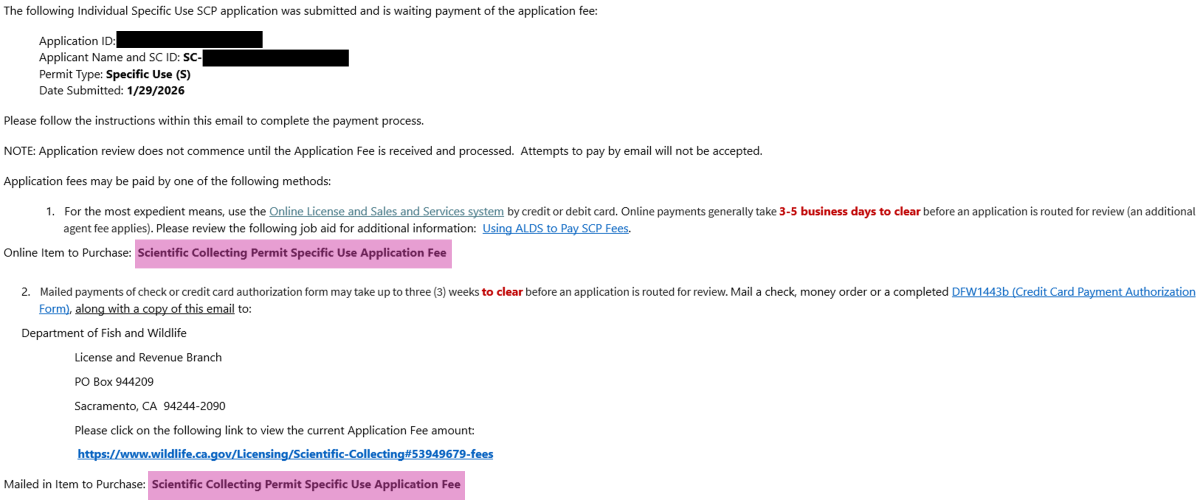
SCPP confirmation email screenshot

By mail

  • You may pay via check or money order (payable to California Department of Fish and Wildlife (CDFW)). You may also complete a Credit Card Authorization Form (PDF) to pay by credit card.
  • Mail payments to CDFW, Attn: License and Revenue Branch, P.O. Box 944209, Sacramento, CA 94244-2090.
  • May take up to 15 business days to process.
  • Not subject to the 5% agent handling fee.

Fees for 2026

Fees paid via Online Licenses and Services include a 5% handling fee.

Fees shown include surcharges or fee adjustments pursuant to Fish and Game Code Sections 713 and 1055. Additional adjustments are made January of every year.

For assistance with payment of an application fee or permit fee, contact the LRB's Special Permits Unit by telephone at (916) 928-5846 or email at spu@wildlife.ca.gov.

Application and Permit Fees

Application fees are paid after an application (for either a new SCP or a SCP renewal) is submitted. Permit fees are paid prior to issuance of the new or renewed permit. Both fees must be paid for the permit to be issued and cannot be paid at the same time.

Name Type Application Fee Permit Fee
a. Scientific Collecting Permit General Use: Inland Fisheries, Marine, or Terrestrial Wildlife Individual, Entity

Check or Money Order: $61.54
Online: $64.54

Check or Money Order: $254.67
Online: $267.02
b. Scientific Collecting Permit General Use: Inland Fisheries, Marine, or Terrestrial Wildlife (Student) Student

Check or Money Order: $33.99
Online: $35.64

Check or Money Order: $68.75
Online: $72.10
c. Scientific Collecting Permit Specific Use Individual, Entity Check or Money Order: $98.62
Online: $103.42
Check or Money Order: $366.75
Online: $384.70
d. Scientific Collecting Permit Specific Use (Student) Student Check or Money Order: $33.99
Online: $35.64
Check or Money Order: $68.75
Online: $72.10

Amendment Fees

For SCP amendment applications, a single fee is paid after the request is submitted.

Title Permitholder Type Amendment Fee
a. Scientific Collecting Permit General Use: Inland Fisheries, Marine, or Terrestrial Wildlife Individual, Entity Check or Money Order: $83.95
Online: $88.05
b. Scientific Collecting Permit Specific Use Amendment Individual, Entity Check or Money Order: $122.83
Online: $128.78
c. Scientific Collecting Permit General Use or Specific Use Amendment (Student) Student Check or Money Order: $33.99
Online: $35.64

Required Forms

Form Type Format Form Name Form No.
Form Download, complete, and upload to the SCP Portal Scientific Collecting – Mandatory Wildlife Report DFW 1379a (Excel)
Form Complete and submit in the SCP Portal, or according to permit conditions Scientific Collecting – Notification of Field Activity Instructions page
DFW 1379b (PDF)
Form Download, complete, and upload to the SCP Portal (when required by permit conditions) Transfer of Possession – Chain of Custody DFW 1379c (PDF)
Form Ensure stays with final permit Scientific Collecting – Standard Conditions for all Permits DFW 1379d (PDF)

Rulemaking Documents

See the CDFW Rulemaking: Scientific Collecting Permits page for the full 2018 rulemaking files and Proposed Rulemaking: Scientific Collecting Permits: Terrestrial and Vernal Pool Invertebrates of Conservation Priority List for the 2024 rulemaking.

Contacts and Support

General Inquiries

General questions about the SCP program, technical issues with the SCP Portal, and other general questions can be sent to SCPermits@wildlife.ca.gov.

Fisheries

Inland Fisheries: Reviews for anadromous and non-anadromous fish and aquatic invertebrates, sampled in inland salt or freshwater

Fisheries Branch Permitting page

Fisheries Permitting Contact: FBSCpermits@wildlife.ca.gov

Marine

Marine: Reviews for anadromous & non-anadromous fish, algae, seagrasses, and invertebrates sampled in marine waters

Marine Permitting Contact: MarineSCP@wildlife.ca.gov

Wildlife

Terrestrial Wildlife: Reviews for amphibians, reptiles, birds, mammals, terrestrial invertebrates, and vernal pool invertebrates

Wildlife Branch Research Permitting page

Terrestrial Wildlife SCP Contact: TerrestrialWildlifeSCPs@wildlife.ca.gov